Object
Property Shorthand
เรียนรู้การใช้ variable เป็น value ใน object และเขียน property shorthand ให้สั้นลง
Property Shorthand คืออะไร
เวลาเรามีตัวแปรอยู่แล้ว และอยากใช้ค่าของตัวแปรนั้นเป็น value ใน object — ปกติต้องเขียน `{ key: variableName }` แต่ JavaScript มี syntax ที่เรียกว่า **Property Shorthand** ที่ช่วยลดการเขียนซ้ำ: เมื่อชื่อ key ตรงกับชื่อตัวแปรพอดี เขียนแค่ชื่อตัวแปรตัวเดียวก็พอ
ไม่ว่าจะใช้แบบเต็มหรือ shorthand — object ที่ได้เหมือนกันทุกประการ แค่ shorthand สั้นกว่าและอ่านง่ายกว่า
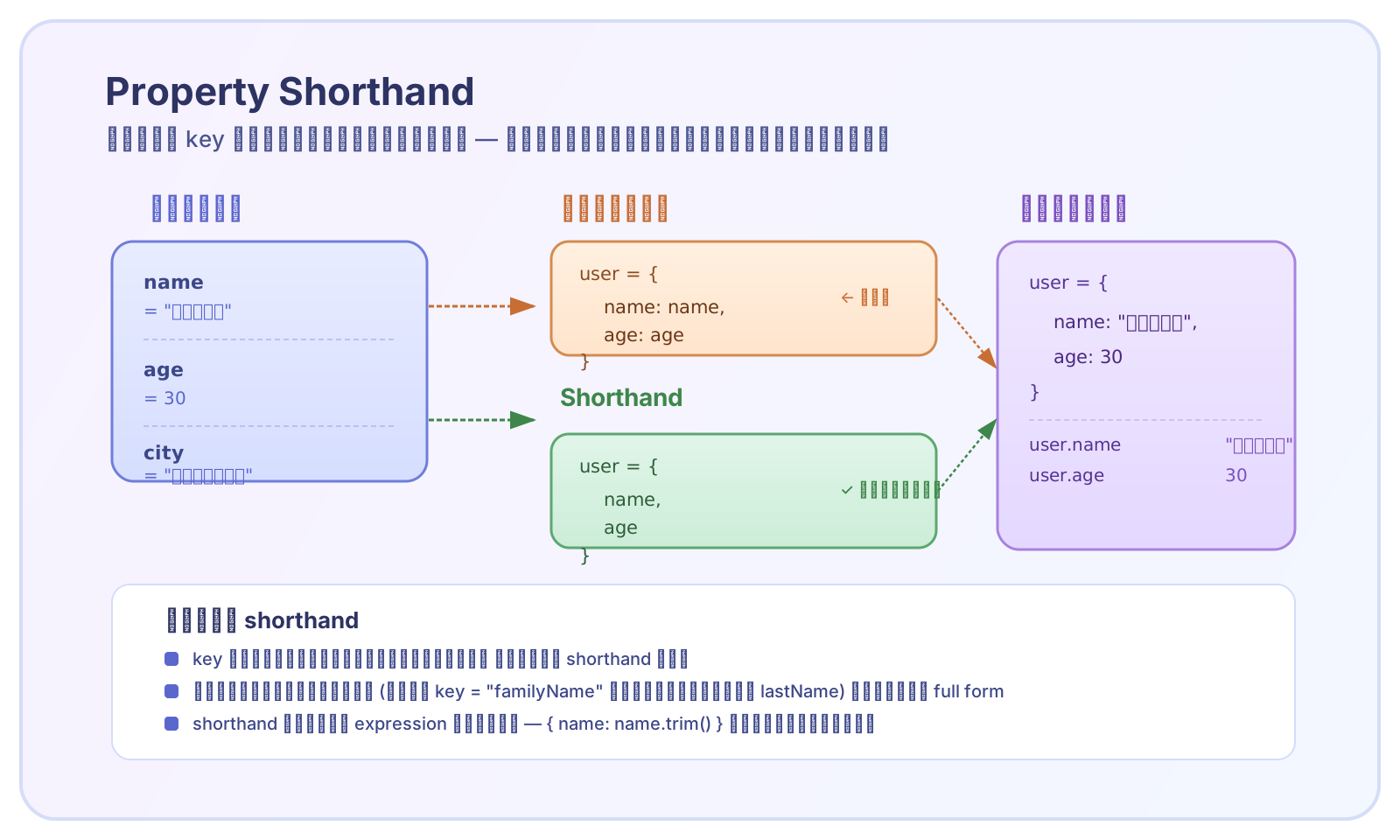
Object แบบเต็มและแบบ shorthand ได้ผลลัพธ์เหมือนกัน — shorthand ลดความซ้ำซ้อนเมื่อ key กับตัวแปรชื่อตรงกัน
หัวใจของ shorthand: **JavaScript เอาชื่อตัวแปรไปเป็น key โดยอัตโนมัติ และเอาค่าของตัวแปรไปเป็น value** — ไม่ต้องพิมพ์ `key: key` ซ้ำอีกต่อไป
ใช้ shorthand ผสมกับ property ปกติ
ในโค้ดจริง ไม่ใช่ทุก property ของ object จะมาจากตัวแปร — บาง property ใช้ค่าคงที่ (literal value) เช่น `status: "active"` หรือ `type: "admin"` shorthand ใช้ผสมกับ property แบบปกติใน object เดียวกันได้ — เลือกใช้ shorthand สำหรับ key ที่ชื่อตรงกับตัวแปร และใช้ full form สำหรับค่าคงที่หรือ key ที่ต้องการชื่ออื่น
shorthand กับ full form อยู่ร่วมกันใน object เดียวได้ — เลือกใช้ตามความเหมาะสม
- key ที่ชื่อตรงกับตัวแปร → ใช้ shorthand `{ name }`
- key ที่ชื่อต่างจากตัวแปร → ใช้ full form `{ label: name }`
- ค่าคงที่ (literal) → ใช้ full form `{ role: "admin" }`
- key ที่ต้องการชื่ออื่นหรือผลลัพธ์จากการคำนวณ → ใช้ full form
เมื่อ key กับ variable ชื่อไม่ตรงกัน
บางครั้งตัวแปรชื่อหนึ่ง แต่ใน object อยากให้ key เป็นอีกชื่อหนึ่ง เช่น ตัวแปรชื่อ `lastName` แต่อยากให้ key ใน object เป็น `familyName` กรณีนี้ **ใช้ shorthand ไม่ได้** — เพราะชื่อไม่ตรงกัน ต้องเขียน full form `{ familyName: lastName }` แต่ถ้ามีตัวแปรอื่นที่ชื่อตรง key ก็ใช้ shorthand ได้ — เลือกเป็นตัว ๆ ไป
เลือกใช้ shorthand เฉพาะ key ที่ชื่อตรงกับตัวแปร — ที่เหลือใช้ full form
กฎคือ: **shorthand ใช้ได้เฉพาะเมื่อชื่อ key ใน object ตรงกับชื่อตัวแปรพอดี ตัวพิมพ์เล็ก/ใหญ่ต้องตรงกันด้วย** (`name` กับ `Name` ถือว่าคนละชื่อกัน)
คำนวณก่อน แล้วสร้าง object ด้วย shorthand
รูปแบบที่เจอบ่อยในโค้ดจริง: คำนวณค่าหรือประมวลผลข้อมูลก่อน → เก็บผลลัพธ์ไว้ในตัวแปร → แล้วค่อยใช้ shorthand สร้าง object shorthand ช่วยให้ขั้นตอนสุดท้าย (สร้าง object) สั้นและอ่านง่าย — เพราะค่าทุกอย่างถูกเตรียมไว้ในตัวแปรแล้ว ใช้แค่ชื่อตัวแปรก็พอ
คำนวณให้เสร็จก่อน — เก็บในตัวแปร — แล้ว shorthand ครั้งเดียวตอนสร้าง object
วิธีนี้ต่อยอดได้กับทุกสถานการณ์: คำนวณอะไรก็ได้ก่อน เก็บในตัวแปร แล้ว shorthand รวมเข้า object โดยไม่ต้องพิมพ์ property ซ้ำ
shorthand ในฟังก์ชันที่ return object
shorthand เข้ากับฟังก์ชันที่ return object ได้ดีเป็นพิเศษ — เพราะ parameter ของฟังก์ชันก็คือตัวแปร และชื่อ parameter มักตรงกับ key ที่เราอยากให้มีใน object อยู่แล้ว
parameter name = key name = shorthand — เหมาะกับ factory function มาก
- ลดการพิมพ์ซ้ำ — ไม่ต้องเขียน `{ name: name, email: email, ... }`
- อ่านง่าย — เห็นชื่อ parameter ก็รู้ว่า object หน้าตาเป็นยังไง
- เพิ่ม literal property ได้ เช่น `role`, `createdAt` — ผสมกันได้ตามต้องการ
- ใช้ได้ทั้ง function declaration, function expression และ arrow function
ข้อควรระวัง
| ข้อควรระวัง | ตัวอย่าง | ผลลัพธ์ |
|---|---|---|
| ตัวแปรที่ใช้ใน shorthand ต้องประกาศก่อนใช้ | `const obj = { name };` — ถ้ายังไม่มี `const name = ...` มาก่อน | **ReferenceError**: `name is not defined` |
| ชื่อต้องตรงกันทุกตัวอักษร (case-sensitive) | `const Name = "A"; const obj = { name: Name };` | ใช้ shorthand ไม่ได้ — ต้องเขียน `{ name: Name }` แบบเต็ม |
| shorthand ใช้กับ expression ไม่ได้ | `{ name: name.trim() }` | ต้องเขียน full form — shorthand ใช้ได้กับ variable reference เท่านั้น |
| ตัวแปรเป็น `undefined` → property ก็เป็น `undefined` | `let x; const obj = { x }; // { x: undefined }` | ไม่เกิด error แต่ value เป็น `undefined` — ตรวจสอบก่อนใช้เสมอ |
กฎง่าย ๆ: **shorthand = ชื่อตัวแปรเท่านั้น ห้ามใส่นิพจน์ ห้ามเรียก method และตัวแปรต้องมีอยู่ก่อน** — ถ้าต้องการทำอะไรที่ซับซ้อนกว่าการอ้างอิงตัวแปรตรง ๆ ให้ใช้ full form