Modern Data Syntax
Object destructuring
เรียนรู้ Object destructuring — syntax ที่ช่วยดึงค่าจาก Object ในบรรทัดเดียว ( { key } = obj ) ครอบคลุมทั้ง rename, default value, nested destructuring และการใช้ใน function parameter ผ่าน Lab 5 ข้อ
Destructuring Object คืออะไร
Destructuring Object คือ syntax ที่ช่วยให้เรา **ดึงค่าจาก Object ไปเก็บในตัวแปร** ได้ในบรรทัดเดียว โดยใช้ชื่อ key เป็นตัวกำหนดว่าอยากได้ค่าไหน แทนที่จะเขียน `obj.key` ซ้ำหลายบรรทัด เราสามารถใช้ `const { key1, key2 } = obj` เพื่อสร้างตัวแปรจาก key ที่ต้องการได้พร้อมกัน
Destructuring Object มีประโยชน์มากเมื่อทำงานกับข้อมูลที่มีหลาย field เช่น API response, config object, หรือ user profile — ช่วยให้หยิบเฉพาะ field ที่ต้องการโดยไม่ต้องเขียน `obj.field` ซ้ำ ๆ
วิธีใช้ Destructuring Object พื้นฐาน
ใช้ `{}` ทางซ้ายของ `=` ใส่ชื่อ key ที่ต้องการ — JavaScript จะสร้างตัวแปรที่มีชื่อเดียวกับ key และกำหนดค่าโดยอัตโนมัติ
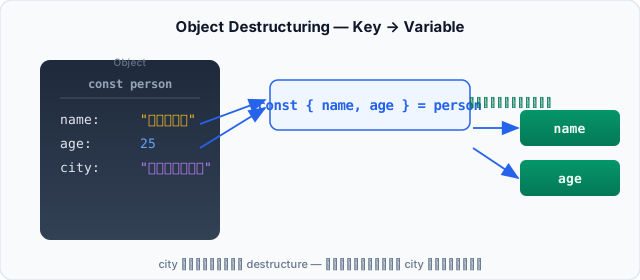
การ destructuring — เลือกเฉพาะ key ที่ต้องการ (name, age) city ไม่ถูกดึงมาด้วย
**กฎข้อแรกและสำคัญที่สุด**: ชื่อตัวแปรต้องตรงกับชื่อ key ใน Object — ถ้าใช้ชื่อผิด JavaScript จะไม่รู้ว่าต้องการ key ไหน และได้ `undefined`
เปลี่ยนชื่อตัวแปรด้วย key: newName
บางครั้งชื่อ key อาจซ้ำกับตัวแปรที่มีอยู่แล้ว หรือเราอยากใช้ชื่อที่สื่อความหมายมากขึ้น — ใช้ `key: newName` เพื่อเปลี่ยนชื่อตอน destructuring ด้านซ้ายของ `:` คือชื่อ key ใน Object, ด้านขวาคือชื่อตัวแปรใหม่ที่จะใช้ต่อไป
สังเกตว่า `name:` ไม่ได้หมายความว่าเราจะใช้ key `name` ต่อ — `name` คือ key ใน Object ส่วน `userName` คือชื่อตัวแปรใหม่ หลัง destructuring แล้ว **ไม่มีตัวแปรชื่อ `name`** เหลืออยู่
กำหนด Default Value เมื่อ key อาจไม่มี
Object อาจมี key ไม่ครบ (เช่น optional field ใน API) — ถ้า destructure key ที่ไม่มีอยู่ ตัวแปรจะเป็น `undefined` ใช้ `= value` เพื่อกำหนดค่า default ที่จะใช้เมื่อ key หายไปหรือมีค่าเป็น `undefined`
**ข้อควรระวัง**: Default จะทำงานกับ `undefined` เท่านั้น — ถ้า key มีค่าเป็น `null`, `0`, `false`, หรือ `""` (string ว่าง) จะไม่ใช้ default เพราะค่าเหล่านี้ไม่ใช่ `undefined`
ใช้ Rename + Default Value ร่วมกัน
ในทางปฏิบัติ เรามักต้องทำทั้งเปลี่ยนชื่อและกำหนด default ไปพร้อมกัน — ใช้ `key: newName = value` ในบรรทัดเดียวได้เลย
ลำดับของ syntax: `ชื่อKey: ชื่อตัวแปรใหม่ = ค่าDefault` — ด้านซ้ายคือ key ใน Object, ตรงกลางคือชื่อตัวแปรที่จะใช้, ด้านขวาคือค่าเริ่มต้น
Nested Destructuring — ดึงค่าจาก Object ซ้อน
เมื่อ Object มี Object ซ้อนอยู่ข้างใน (nested) เราสามารถ destructuring ลึกลงไปได้ โดยใช้ `{ outerKey: { innerKey } }` — ตัวแปรจะถูกสร้างจาก key ชั้นในสุด
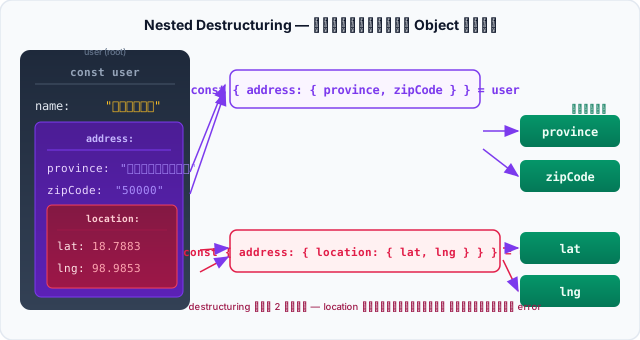
Nested destructuring — { address: { province } } ดึงค่าจาก Object ซ้อน 2 ชั้น ความลึกของ destructuring ต้องตรงกับโครงสร้าง Object
**ข้อควรระวังสำคัญ**: ถ้า key ตรงกลางไม่มีอยู่ (เช่น `address` เป็น `undefined`) JavaScript จะ **throw error ทันที** วิธีป้องกันเบื้องต้นคือเช็กให้แน่ใจว่า Object มีโครงสร้างครบก่อน destructuring — หรือกำหนด default ให้กับ key กลาง: ```js const { address: { province } = {} } = user; // {} คือ default ถ้า address ไม่มี ```
Destructuring ใน Function Parameter
Pattern ที่ใช้บ่อยมาก — โดยเฉพาะใน React component props หรือ function ที่รับ config object — คือการใช้ destructuring ตรง parameter เลย ทำให้ใช้ตัวแปรได้โดยตรง ไม่ต้องเขียน `param.key` ทุกครั้ง
**`= {}` ต่อท้าย parameter สำคัญมาก** — ถ้าไม่มี `= {}` แล้วมีคนเรียก `setup()` โดยไม่ส่ง argument เลย JavaScript จะพยายาม destructure `undefined` แล้ว throw error ทันที
กฎสำคัญและข้อควรระวัง
| Syntax | ความหมาย | ข้อควรระวัง |
|---|---|---|
| `const { name } = obj` | ดึง key `name` สร้างตัวแปร `name` | ชื่อตัวแปรต้องตรงกับชื่อ key — สลับไม่ได้ |
| `const { name: n } = obj` | ดึง key `name` แต่เปลี่ยนชื่อตัวแปรเป็น `n` | `name` หลังจากนี้ไม่มีอยู่ — ต้องใช้ `n` |
| `const { key = 'default' } = obj` | ดึง key `key` ถ้าไม่มีใช้ default | Default ใช้เฉพาะเมื่อค่าเป็น `undefined` — ไม่ใช้กับ `null` |
| `const { a: x = 10 } = obj` | Rename + Default ในบรรทัดเดียว | ลำดับ: `ชื่อKey: ชื่อใหม่ = ค่าDefault` |
| `const { a: { b } } = obj` | Nested destructuring | ถ้า key กลางเป็น `undefined` → throw error |
| `function fn({ a, b } = {})` | Destructuring ใน parameter พร้อม default | ต้องมี `= {}` — ไม่เช่นนั้นเรียก `fn()` แล้ว error |
Destructuring Object เป็นหนึ่งใน syntax ที่ใช้บ่อยที่สุดใน JavaScript สมัยใหม่ — ลองฝึกกับ lab ด้านล่างเพื่อให้มั่นใจว่าเข้าใจทุก pattern ก่อนนำไปใช้จริง