Modern Data Syntax
Array destructuring
เรียนรู้ Array destructuring — syntax ที่ดึงค่าจาก Array ตามตำแหน่ง index ( [a, b] = arr ) ครอบคลุมการข้าม index ด้วย comma, default value, swap ตัวแปร, rest pattern (...rest) และการใช้ใน function parameter ผ่าน Lab 5 ข้อ
Array Destructuring คืออะไร
Array destructuring คือ syntax ที่ช่วยให้เรา **ดึงค่าจาก Array มาเก็บในตัวแปร** ได้ในบรรทัดเดียว โดยใช้ **ตำแหน่ง (index)** เป็นตัวกำหนด — ตัวแปรแรกจะรับค่า index 0, ตัวที่สองรับ index 1 ไปเรื่อย ๆ ใช้ `[]` ทางซ้ายของ `=` แทน `{}` ของ Object destructuring
Array destructuring มีประโยชน์มากเมื่อข้อมูลมาในรูปแบบ **ลำดับ** — เช่น ค่าพิกัด (x, y), ค่า RGB (r, g, b), ค่า return จาก function ที่ return Array (เช่น `useState()` ใน React), หรือการแยกข้อมูลตาราง (CSV) ที่มี column ตายตัว
วิธีใช้ Array Destructuring พื้นฐาน
ใช้ `[]` ทางซ้าย ใส่ชื่อตัวแปรตามลำดับ — ตัวแปรแรก = index 0, ตัวที่สอง = index 1 ต่อไปเรื่อย ๆ ไม่ต้องดึงทุกตัวก็ได้
![ภาพแสดงการ map จาก index 0,1,2 ของ Array colors มายังตัวแปร first, second, third ผ่าน const [first, second, third] = colors](/illustrations/javascript/destructuring-array-index.svg)
Array destructuring — ตำแหน่งกำหนดตัวแปร index 0 → ตัวแปรแรก, index 1 → ตัวแปรที่สอง, index 2 → ตัวแปรที่สาม
**กฎสำคัญที่สุด**: ลำดับคือทุกอย่าง — ผิดตำแหน่ง = ผิดค่า ไม่เหมือน Object ที่ใช้ชื่อ key จึงสลับที่ได้
ข้าม Index ด้วย Comma
เมื่อต้องการดึงเฉพาะบาง index — ใช้ **comma เปล่า ๆ** (ไม่ต้องตั้งชื่อตัวแปร) เพื่อข้ามตำแหน่งที่ไม่ต้องการ Comma แต่ละตัวแทนการข้าม 1 index
Comma แต่ละตัวคือ 1 index — `[a, , b]` หมายถึงตัวแปร a รับ index 0, ข้าม index 1, ตัวแปร b รับ index 2
Default Value — ป้องกัน Undefined
ถ้าดึงตัวแปรมากกว่าจำนวน element ใน Array — ตัวแปรส่วนเกินจะเป็น `undefined` ใช้ `= value` เพื่อกำหนด default value ที่จะใช้แทนเมื่อไม่มี element ที่ตำแหน่งนั้น
**ข้อควรระวัง**: Default จะทำงานกับ `undefined` เท่านั้น — `null`, `0`, `false`, `""` จะไม่ถูกแทนที่ด้วย default เพราะไม่ใช่ `undefined`
Swap ตัวแปรในบรรทัดเดียว
Array destructuring มีความสามารถพิเศษ — **สลับค่าสองตัวแปรได้ในบรรทัดเดียว** โดยไม่ต้องมีตัวแปรชั่วคราว (temp variable) นี่เป็น pattern ที่เจอบ่อยใน algorithm และการจัดการ state
เบื้องหลังการทำงาน: `[y, x]` สร้าง Array ใหม่ `[20, 10]` แล้ว `[x, y] = ...` จึง destructure ค่ากลับเข้าไป — ไม่ได้สลับค่าเดิมตรง ๆ แต่สร้าง Array ใหม่มาทับ
Rest Pattern — เก็บค่าที่เหลือใน Array
ใช้ `...rest` เพื่อเก็บ element ที่เหลือทั้งหมดไว้ใน **Array ใหม่** — มีประโยชน์เมื่อเราสนใจแค่ element แรก ๆ แต่อยากเก็บส่วนที่เหลือไว้ใช้ต่อโดยไม่ต้อง `slice()` `...rest` ต้องอยู่ตำแหน่งสุดท้ายเสมอ — เพราะมันเก็บทุก element นับจากจุดนั้นไปจนหมด
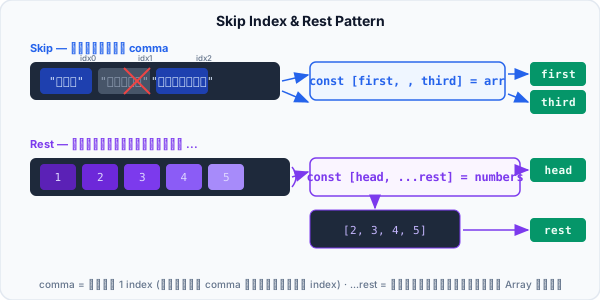
ด้านบน: Skip — [first, , third] ข้าม index 1 ด้วย comma · ด้านล่าง: Rest — [head, ...rest] เก็บค่าที่เหลือเป็น Array ใหม่
**กฎ**: `...rest` ต้องอยู่ตำแหน่งสุดท้ายเท่านั้น — `[a, ...rest, b]` เขียนไม่ได้เพราะ `...rest` จะกินทุกค่าจนหมด b จึงไม่มีทางได้ค่า
Destructuring ใน Function Parameter (Array)
เช่นเดียวกับ Object — เราสามารถ destructure Array ตรง function parameter ได้เลย ใช้บ่อยเมื่อ function รับ Array ที่มีโครงสร้างแน่นอน เช่น `[command, ...args]`
การใส่ `= []` ต่อท้าย parameter ป้องกันกรณีที่ function ถูกเรียกโดยไม่ส่ง argument — เช่นเดียวกับ `= {}` ใน Object destructuring
กฎสำคัญและข้อควรระวัง
| Syntax | ความหมาย | ข้อควรระวัง |
|---|---|---|
| `const [a, b] = arr` | ดึง index 0 → a, index 1 → b | ลำดับสำคัญ — สลับที่ไม่ได้ ผิดที่=ผิดค่า |
| `const [a, , b] = arr` | ข้าม index 1 — a = index 0, b = index 2 | แต่ละ comma = 1 index — `[,,c]` ข้าม 2 ตำแหน่ง |
| `const [a = 0] = arr` | Default value — ใช้เมื่อ element เป็น undefined | `null` ไม่ใช้ default — default ใช้กับ undefined เท่านั้น |
| `[a, b] = [b, a]` | Swap ค่า — ใช้ `=` ธรรมดา ไม่ใช่ `const` | สร้าง Array ใหม่ทางขวา — ไม่ได้สลับค่าแท้ ๆ |
| `const [a, ...r] = arr` | Rest pattern — เก็บค่าที่เหลือใน r | ต้องอยู่ตำแหน่งสุดท้าย — `[a, ...r, b]` ใช้ไม่ได้ |
| `function fn([a, b] = [])` | Destructuring ใน parameter | ต้องมี `= []` ป้องกันเรียก fn() โดยไม่มี argument |
Array destructuring ใช้บ่อยกว่าที่คิด — ทั้ง React, API response parsing, และ algorithm ทั่วไป การรู้ว่าเมื่อไหร่ควรใช้ Object destructuring ({}) และเมื่อไหร่ควรใช้ Array destructuring ([]) จะช่วยให้เขียนโค้ดได้กระชับและสื่อความหมายชัดเจน