Arrays
Array length
เจาะลึก property .length — ตั้งแต่กฎ length = highestIndex + 1, การตั้งค่า length เพื่อตัด (truncate) หรือขยาย array (expand), การสังเกต empty slot vs undefined, และการหลีกเลี่ยง bug จากการ assign index เกินขอบเขตที่ทำให้ length กระโดดโดยไม่ตั้งใจ
`length` คืออะไร — กฎสำคัญที่ต้องรู้
ในบทก่อนเราใช้ `.length` เพื่อนับจำนวน element และใช้ `arr[arr.length - 1]` เพื่อหาตัวท้าย แต่ `length` มีอะไรมากกว่านั้น — เราเปลี่ยนค่ามันได้ด้วย และกฎสำคัญที่ต้องจำคือ **length = highestIndex + 1** นั่นหมายความว่า `length` ไม่ใช่ "จำนวน element ที่มีค่าจริง" เสมอไป — ถ้ามีช่องว่าง (empty slot) ระหว่างกลาง `length` จะมากกว่าจำนวน element จริง
**ข้อแตกต่างสำคัญ:** • `length` = highestIndex + 1 → คิดเลขจากตำแหน่งสูงสุด • จำนวน element จริง → ขึ้นอยู่กับว่ามีค่าอยู่ที่ index ไหนบ้าง ใน array ปกติที่ไม่มี empty slot ทั้งสองค่าจะเท่ากัน — แต่ถ้ามี empty slot จะต่างกันทันที
ตั้งค่า `length` เพื่อตัด Array (Truncate)
`length` เป็น **writable property** — เรา assign ค่าใหม่ให้มันได้ และ array จะเปลี่ยนขนาดทันที การตั้ง `length` ต่ำกว่าปัจจุบันจะ **ตัด element ที่เกินออกไป** — element เหล่านั้นหายไปถาวร ไม่สามารถกู้คืนได้ นี่เป็นวิธีที่เร็วที่สุดในการล้าง array ให้เป็นอาร์เรย์เปล่า — `arr.length = 0`
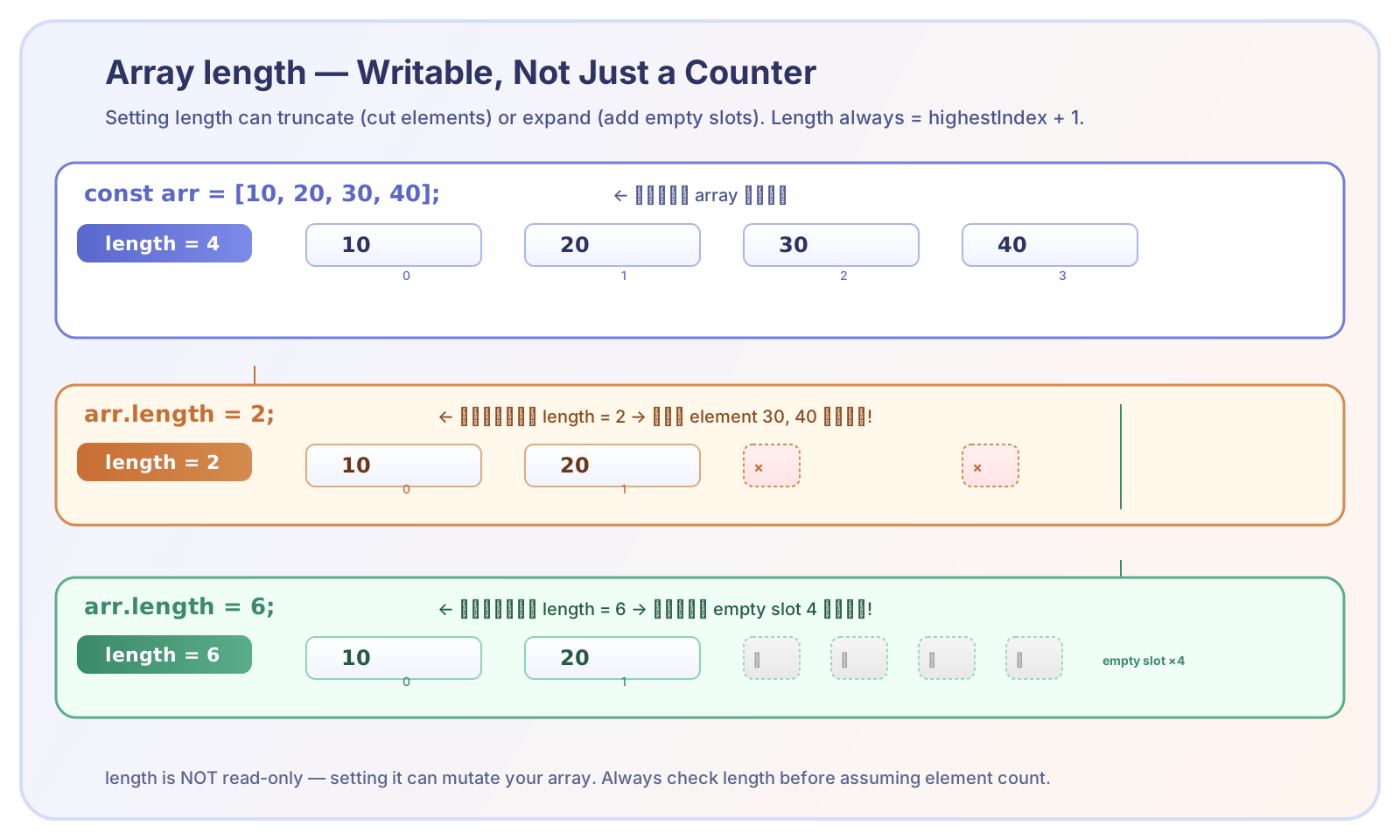
ตั้งค่า length ต่ำลง → ตัด element ทิ้งสูญหายถาวร ตั้งค่า length สูงขึ้น → เพิ่ม empty slot (ไม่ใช่ undefined)
⚠️ **element ที่ถูกตัดหายไปถาวร** — ไม่มีวิธีกู้คืน ดังนั้นก่อนตั้ง `length` ต่ำกว่าปัจจุบัน ให้แน่ใจว่าข้อมูลที่ถูกตัดไม่จำเป็นต้องใช้แล้ว
ตั้งค่า `length` เพื่อขยาย Array (Expand)
การตั้ง `length` มากกว่าเดิมจะ **ขยาย array** — ตำแหน่งที่เพิ่มมาจะเป็น **empty slot** (hole) ไม่ใช่ `undefined` ความต่างระหว่าง empty slot กับ `undefined`: • empty slot = "ไม่มีช่องตรงนี้เลย" — array มีรูโหว่ • `undefined` = "มีช่องตรงนี้ และค่าข้างในคือ undefined" ทั้งสองอย่างอ่านค่าออกมาได้เป็น `undefined` เหมือนกัน แต่โครงสร้างภายในต่างกัน
Assign Index เกินขอบเขต → `length` เปลี่ยนอัตโนมัติ
อีกกรณีที่ `length` เปลี่ยนโดยเราไม่ได้ตั้งใจคือการ assign ค่าให้ index ที่เกินขอบเขต — JavaScript จะขยาย array ให้อัตโนมัติ และ `length` จะกระโดดตาม index ที่เราใช้ นี่คือหนึ่งใน bug ที่เจอบ่อยที่สุด — โปรแกรมเมอร์ตั้งใจเปลี่ยนค่าที่ index ใด index หนึ่ง แต่พิมพ์เลขผิด ทำให้ `length` เพิ่มขึ้นโดยไม่ตั้งใจ
เพราะฉะนั้นก่อนใช้ bracket notation เพื่ออัปเดตค่า ให้เช็ก index ให้แม่น — ความผิดพลาดนิดเดียวอาจทำให้ array ใหญ่ขึ้นโดยไม่ตั้งใจ และ bug จะตามมาเมื่อโค้ดใช้ `length` ในการตัดสินใจบางอย่าง
Empty Slot vs `undefined` — ต่างกันอย่างไร
ถึงแม้ทั้ง empty slot และ `undefined` จะอ่านออกมาเป็น `undefined` เหมือนกัน แต่ในเชิงโครงสร้างต่างกันอย่างมีนัยสำคัญ: • `array.length` นับรวม empty slot ด้วย (เพราะ `length = highestIndex + 1`) • `for` loop ปกติ (`for (let i = 0; i < arr.length; i++)`) จะวิ่งครบทุก index — มองเห็น empty slot เป็น `undefined` — ต่างจากวิธีวนซ้ำอื่นที่จะเรียนในบทต่อไป • การเช็กด้วย `hasOwnProperty(index)` — empty slot จะคืน `false`, `undefined` จริงจะคืน `true`
จุดที่มือใหม่มักพลาด
- `length` คือ highestIndex + 1 — ไม่ใช่จำนวน element ที่มีค่าจริง (เมื่อมี empty slot จะต่างกัน)
- ตั้ง `length` ต่ำกว่าปัจจุบัน — element ที่ถูกตัดจะหายไปถาวร ไม่สามารถกู้คืนได้
- ตั้ง `length` สูงกว่าปัจจุบัน — ได้ empty slot ไม่ใช่ undefined (hole ≠ undefined)
- assign index เกินขอบเขต — `length` จะกระโดดตามโดยอัตโนมัติ ทำให้ array มีช่องว่าง
- empty slot กับ undefined ไม่เหมือนกัน — ใช้ `in` operator เช็กได้ว่า index นั้นมีค่าจริงหรือเป็นช่องว่าง
- `arr.length = 0` เป็นวิธีล้าง array ที่เร็วที่สุด — แต่ข้อมูลหายถาวร