Array Methods
findIndex
เรียนรู้ findIndex() — method หา index (ตำแหน่ง) ของ element ตัวแรกที่ตรงเงื่อนไข หยุดทันทีเมื่อเจอ คืน -1 เมื่อไม่เจอ โดยไม่เปลี่ยนต้นฉบับ ตั้งแต่ callback return true/false, การหา index จาก property, การจัดการ -1, การใช้ index เปลี่ยนค่าใน array ต้นฉบับ, ไปจนถึง findIndex() vs find() vs indexOf() ผ่าน Lab 3 ข้อ
`findIndex()` คืออะไร — หา index ของ element ตัวแรกที่ตรงเงื่อนไข
`findIndex()` เป็น method ของ array ที่รับ callback function — ทำงานเหมือน `find()` แต่คืน **index (ตำแหน่ง)** ของ element ตัวแรกที่ตรงตามเงื่อนไข — ไม่ใช่ตัว element เอง กฎสำคัญ: • `findIndex()` จะคืน **index (number)** ของ element ตัวแรกที่ callback return `true` • `findIndex()` จะคืน **`-1`** ถ้าไม่มี element ไหนเลยที่ผ่านเงื่อนไข — ไม่ error • `findIndex()` หยุดทันทีที่เจอตัวแรกที่ผ่าน — element ที่เหลือจะไม่ถูกเช็ก • `findIndex()` ไม่เปลี่ยน array ต้นฉบับ (immutable method) ใช้ `findIndex()` เมื่อคุณอยากรู้ **ตำแหน่ง** ของ element — ไม่ใช่ตัว element เอง — เช่น หาตำแหน่งของ user ใน array, ต้องการเปลี่ยนค่า element นั้นด้วย index, หรือเปรียบเทียบ index กับค่าอื่น
สิ่งสำคัญที่ต้องรู้: • callback จะรับ element ทีละตัวตามลำดับ — `s` คือ element (45, 82, 67, 91, 55) ตามลำดับ • `s > 50` — 45 (false → ไปต่อ), 82 (true → หยุด! คืน index 1) • ผลลัพธ์คือ **index** (ตัวเลขตำแหน่ง) ไม่ใช่ element — ใช้ `scores[index]` เข้าถึง element ได้ • ถ้าไม่มีตัวไหน > 50 เลย → `findIndex()` คืน `-1` `findIndex()` มีประโยชน์มากเมื่อคุณต้องการ **เปลี่ยนค่า** element นั้นใน array ต้นฉบับ (mutable update) — `arr[arr.findIndex(...)] = newValue`
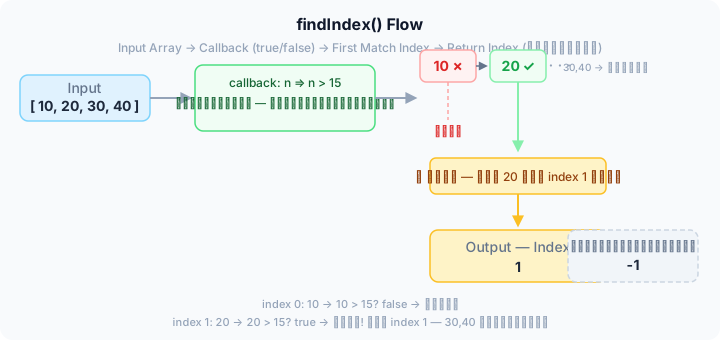
findIndex() รับ element ทีละตัวตามลำดับ → ส่งให้ callback เช็ก true/false → เจอ true ตัวแรก → หยุด! คืน index — ถ้าไม่มีเลย → คืน -1
Callback ของ `findIndex()` — element, index, array
callback function ที่ส่งให้ `findIndex()` รับ parameter ได้ 3 ตัว — เหมือน `find()`, `map()`, และ `filter()`: • **element** — ค่าของ element ปัจจุบัน • **index** — ตำแหน่ง index ของ element ปัจจุบัน (มีประโยชน์มากกับ `findIndex()`) • **array** — array ต้นฉบับทั้งหมด (ใช้น้อย) tip: การใช้ `index` parameter ใน callback ของ `findIndex()` มีประโยชน์เมื่อต้องการเช็กเงื่อนไขที่เกี่ยวกับตำแหน่ง — เช่น หา element ที่ index เป็นเลขคู่, หรือหาจากตำแหน่งที่กำหนดเป็นต้นไป
วิธีเขียน callback — เหมือน `find()` ทุกประการ: • **Arrow function แบบ shorthand** — `u => u.id === 2` — สั้น ใช้มากที่สุด • **Arrow function แบบเต็ม** — `(u) => { return u.id === 2; }` — ใช้เมื่อมี logic หลายบรรทัด • **ใช้ทั้ง element และ index** — `(name, i) => i >= 2 && name.length > 4` — เมื่อต้องการเช็กตำแหน่งด้วย สำหรับ `findIndex()` การใช้ index parameter มีประโยชน์มากกว่า `find()` — เพราะคุณกำลังหาตำแหน่งอยู่แล้ว อาจต้องการเช็กตำแหน่งบางอย่างในเวลาเดียวกัน
`findIndex()` vs `find()` vs `indexOf()` — เลือกใช้ให้เหมาะ
ทั้งสาม method ใช้หาของใน array — แต่คืนค่าต่างกันและใช้ในสถานการณ์ต่างกัน: • **`find()`** — รับ callback → คืน **element ตัวแรก** ที่ผ่านเงื่อนไข (หรือ `undefined`) • **`findIndex()`** — รับ callback → คืน **index ของ element ตัวแรก** ที่ผ่านเงื่อนไข (หรือ `-1`) • **`indexOf()`** — รับ **ค่า** โดยตรง (ไม่ใช่ callback) → คืน **index ของค่านั้น** (หรือ `-1`) — ใช้ `===` กฎเลือกใช้: • อยากได้ element → ใช้ `find()` • อยากได้ index — และเงื่อนไขซับซ้อน (callback) → ใช้ `findIndex()` • อยากได้ index — และรู้ค่าที่ต้องการแน่ ๆ (ตัวเลข, string ตรง ๆ) → ใช้ `indexOf()` • อยากเปลี่ยนค่าใน array ต้นฉบับ → ใช้ `findIndex()` หา index ก่อน แล้ว `arr[idx] = newValue`
| เรื่อง | find() | findIndex() | indexOf() |
|---|---|---|---|
| รับอะไร | callback function | callback function | ค่าที่ต้องการหาโดยตรง |
| คืนค่าเมื่อเจอ | element ตัวแรก | index ของ element ตัวแรก | index ของค่าตัวแรกที่ === ตรงกัน |
| คืนค่าเมื่อไม่เจอ | undefined | -1 | -1 |
| หา object ได้ไหม | ได้ — callback เช็ก property ได้ | ได้ — callback เช็ก property ได้ | ไม่ได้ — === เทียบ reference (คนละ object) |
| หลายเงื่อนไข | ได้ — ใช้ && || ใน callback | ได้ — ใช้ && || ใน callback | ไม่ได้ — หาได้แค่ค่าเดียว |
| ใช้กับ NaN ได้ไหม | ได้ (callback ใช้ isNaN) | ได้ (callback ใช้ isNaN) | ไม่ได้ (NaN !== NaN) |
| เมื่อไหร่ควรใช้ | อยากได้ element ไปใช้ต่อ | อยากได้ index — เพื่อเปลี่ยนค่าใน array หรือเทียบตำแหน่ง | อยากรู้ตำแหน่งของค่าที่รู้แน่ ๆ — เร็วและสั้น |
ข้อผิดพลาดที่พบบ่อยเมื่อใช้ `findIndex()`
- ลืมตรวจสอบ `-1` — `findIndex()` คืน `-1` เมื่อหาไม่เจอ — ถ้าใช้ `arr[-1]` จะได้ `undefined` (ไม่ error แต่ได้ค่าผิด) — ต้องเช็ก `if (idx !== -1)` ก่อนใช้ index เสมอ
- ลืม `return` ใน callback — `arr.findIndex(n => { n > 3 })` — ไม่มี return → callback return `undefined` (falsy) → ไม่มีตัวไหนผ่าน → ได้ `-1` — แก้โดยใช้ shorthand `n => n > 3` หรือเติม `return`
- ใช้ `findIndex()` เมื่ออยากได้ element — `const el = arr[arr.findIndex(...)]` — ซับซ้อนเกินไป — ถ้าอยากได้ element ใช้ `find()` โดยตรง — `findIndex()` มีไว้หา **index** เพื่อใช้เปลี่ยนค่าหรือเปรียบเทียบตำแหน่ง
- คิดว่า `findIndex()` คืนหลาย index — `findIndex()` หยุดที่ตัวแรกเหมือน `find()` — ไม่ได้คืน index ของทุกตัวที่ผ่าน — ถ้าอยากได้ทุก index ต้องใช้ `filter()` + `map()` หรือ loop
- ใช้ `findIndex()` แทน `indexOf()` สำหรับค่าตรง ๆ — `arr.findIndex(x => x === "hello")` ทำงานได้ แต่ซับซ้อนเกิน — `arr.indexOf("hello")` สั้นกว่า เร็วกว่า — ใช้ `indexOf()` เมื่อหาแค่ค่าตรง ๆ ตัวเดียว
เช็กความเข้าใจก่อนลงมือทำ
ทดสอบความเข้าใจ concepts สำคัญของ findIndex() ก่อนเริ่มทำ Lab — ตอบทุกข้อให้ครบเพื่อให้แน่ใจว่าพร้อมลงมือเขียนโค้ดจริง คำถามครอบคลุม 4 เรื่องที่ควรแม่น: ค่าที่ findIndex() คืน, callback parameter, การเลือกใช้ method ให้เหมาะ, และข้อผิดพลาดที่พบบ่อย
ตอบคำถาม 4 ข้อให้ครบก่อนเริ่มเขียนโค้ดใน Lab
const idx = users.findIndex(u => { u.role === "admin" });ตอบครบทุกข้อแล้ว — ถึงเวลาเอา concepts ไปใช้ใน Lab จริง 3 ข้อด้านล่าง: • **Lab 1** — หา index ของ admin ด้วย `findIndex()` • **Lab 2** — จัดการกรณีคืน `-1` + เปลี่ยนค่าใน array ต้นฉบับ • **Lab 3** — เปรียบเทียบ `findIndex()` vs `indexOf()` โดยตรง