Array Methods
find
เรียนรู้ find() — method หา element ตัวแรกที่ตรงเงื่อนไขและหยุดทันที คืน element เดียว (หรือ undefined ถ้าไม่เจอ) โดยไม่เปลี่ยนต้นฉบับ ตั้งแต่ callback return true/false, การหา object จาก id, การจัดการ undefined, ข้อผิดพลาดที่พบบ่อย ไปจนถึง find() vs filter() ผ่าน Lab 3 ข้อ
`find()` คืออะไร — หา element ตัวแรกที่ตรงเงื่อนไข
`find()` เป็น method ของ array ที่รับ callback function — เรียก callback ทีละตัวตามลำดับ element ใน array **จนกว่า** callback จะ return `true` — แล้วคืน (return) **element ตัวนั้น** ทันที โดยไม่เช็ก element ที่เหลือต่อ กฎสำคัญ: • `find()` จะคืน **element เดียว** — ไม่ใช่ array — ต่างจาก `filter()` ที่คืน array • `find()` จะหยุดทันทีที่เจอ element แรกที่ callback return `true` — element ที่เหลือจะไม่ถูกเช็ก • `find()` จะคืน `undefined` ถ้าไม่มี element ไหนเลยที่ callback return `true` — ไม่ error • `find()` ไม่เปลี่ยน array ต้นฉบับ (immutable method) ใช้ `find()` เมื่อคุณอยากหา element **ตัวแรก** ที่ตรงตามเงื่อนไข — เช่น หา user จาก id, หาสินค้าตัวแรกที่มีในสต็อก, หรือหาคะแนนแรกที่ผ่านเกณฑ์
สิ่งสำคัญที่ต้องรู้: • callback จะรับ element ทีละตัวตามลำดับ — `n` คือ element (1, 3, 2, 5, 4) ตามลำดับ • callback ต้อง return boolean — `n % 2 === 0` คืน `true` สำหรับ 2 (เลขคู่ตัวแรก) • พอเจอ 2 → `find()` หยุดทันที — 5 และ 4 จะไม่ถูกเช็กเลย • ผลลัพธ์คือ `2` (element เอง) — ไม่ใช่ `[2]` (array) — ต่างจาก `filter()` อย่างชัดเจน • ถ้าไม่มีเลขคู่เลย → `find()` คืน `undefined`
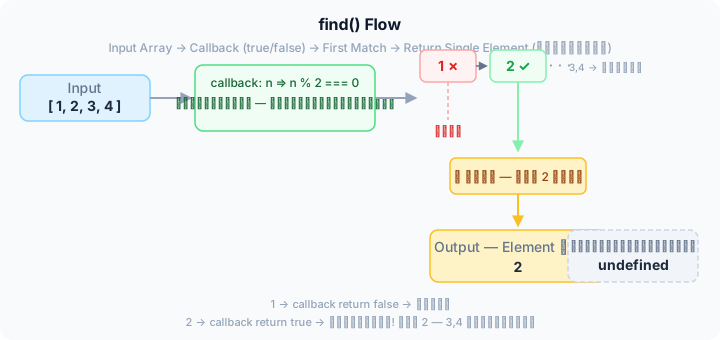
find() รับ element ทีละตัวตามลำดับ → ส่งให้ callback เช็ก true/false → เจอ true ตัวแรก → หยุด! คืน element ตัวนั้น — ถ้าไม่มีเลย → คืน undefined
Callback function ของ `find()` — element, index, array
callback function ที่ส่งให้ `find()` รับ parameter ได้ 3 ตัว — เหมือน `map()` และ `filter()`: • **element** — ค่าของ element ปัจจุบัน (ใช้บ่อยที่สุด) • **index** — ตำแหน่ง index ของ element ปัจจุบัน • **array** — array ต้นฉบับทั้งหมด (ใช้น้อยมาก) จุดสำคัญของ `find()`: • **callback ต้อง return boolean** — `true` = หยุดและคืน element นี้, `false` = ไปต่อ • **ค่าที่ return ถูกแปลงเป็น boolean อัตโนมัติ** (truthy/falsy) — เหมือน `filter()` • ถ้า callback return `true` → `find()` หยุดทันทีด้วย element ตัวนั้น • ถ้า callback return `false` ทุกตัว → `find()` คืน `undefined`
เคล็ดลับ: ในงานจริง `find()` ถูกใช้บ่อยที่สุดเพื่อหา object จาก id — `arr.find(item => item.id === targetId)` — เพราะมี `id` เป็นค่าที่ไม่ซ้ำกันแน่นอน ใช้ `index` เมื่อต้องการเช็กแค่บางตำแหน่ง — เช่น หา element ตั้งแต่ตำแหน่งที่ 3 ขึ้นไป — หรือหา element ตามลำดับที่ต้องการ
`find()` ในสถานการณ์จริง
`find()` เจอบ่อยมากในงานจริง — ทุกครั้งที่ต้องหาข้อมูลหนึ่งชิ้นจาก array: • หา object จาก id (user, product, order) • หาสินค้าตัวแรกที่ยังมีในสต็อก • หาคะแนนแรกที่ผ่านเกณฑ์ • ตรวจสอบว่ามี element ที่ตรงเงื่อนไขหรือไม่ (ใช้ `if (result)` หลัง `find()`) • หาค่าแรกในช่วงที่ต้องการ ข้อดีของ `find()` เหนือ `filter()`: คืน element เดียว — ไม่ต้องใช้ `[0]` ต่อท้าย — และหยุดทันที ไม่ต้องเช็กทั้ง array
ข้อผิดพลาดที่พบบ่อยเมื่อใช้ `find()`
- คิดว่า `find()` คืน array — `find()` คืน **element เดียว** — ถ้าอยากได้ array ใช้ `filter()` — `const first = arr.filter(f).find(...)` ไม่ถูก — ใช้ `arr.find(...)` โดยตรง
- ลืม return ใน callback — `arr.find(n => { n > 3 })` — ไม่มี return → callback return `undefined` (falsy) → ไม่มีตัวไหนผ่านเลย → `find()` คืน `undefined` — แก้โดยใช้ shorthand `n => n > 3` หรือเติม `return`
- ไม่ตรวจสอบ `undefined` — `find()` คืน `undefined` เมื่อหาไม่เจอ — ถ้าใช้ผลลัพธ์ต่อโดยไม่เช็ก จะเกิด error — `const user = arr.find(...); console.log(user.name)` → TypeError ถ้า `user` เป็น `undefined`
- คิดว่า `find()` คืนทุกตัวที่ตรงเงื่อนไข — `find()` คืนแค่ **ตัวแรก** — ถ้าอยากได้ทุกตัวที่ตรงเงื่อนไข ใช้ `filter()` — `arr.filter(n => n > 5)`
- คิดว่า `find()` หยุดเมื่อเจอ false — `find()` หยุดเมื่อเจอ **true** — ถ้า return false → ไปต่อ — return true → หยุดทันที
`find()` vs `filter()` — เลือกใช้ให้เหมาะ
`find()` และ `filter()` ใช้หา element ใน array ได้ทั้งคู่ — แต่คืนค่าต่างกัน: • `find()` — หา **element ตัวแรก** ที่ตรงเงื่อนไข → คืน **element** (หรือ `undefined`) • `filter()` — หา **ทุก element** ที่ตรงเงื่อนไข → คืน **array ใหม่** (หรือ `[]`) กฎง่าย ๆ: • อยากได้ element ตัวเดียว → ใช้ `find()` • อยากได้หลาย element ที่ผ่านเงื่อนไข → ใช้ `filter()` • `find()` หยุดที่ตัวแรก → เร็วกว่าเมื่อ array ใหญ่ → ไม่ต้องเช็กทั้ง array • `filter()` ต้องเช็กทุกตัวเสมอ
| เรื่อง | find() | filter() |
|---|---|---|
| คืนค่า | element เดียว (หรือ undefined) | array ใหม่ (หรือ []) |
| หยุดเมื่อไหร่ | หยุดทันทีที่เจอตัวแรกที่ผ่าน | เช็กทุกตัวเสมอ |
| จำนวนบรรทัด | 1–2 บรรทัด | 1–2 บรรทัด |
| ไม่เปลี่ยนต้นฉบับ | ไม่เปลี่ยน ✓ | ไม่เปลี่ยน ✓ |
| เมื่อเจอตัวที่ต้องการหลายตัว | คืนแค่ตัวแรก — ตัวที่เหลือถูกละเลย | คืนทุกตัวที่ผ่าน — ครบถ้วน |
| เมื่อไม่มีตัวไหนผ่านเลย | undefined | [] (array ว่าง) |
| เมื่อไหร่ควรใช้ | หา element ตัวแรกที่ตรงเงื่อนไข — หา id, หาสินค้าตัวแรก, หาคะแนนแรกที่ผ่าน | กรอง element ทุกตัวที่ตรงเงื่อนไข — รายการสินค้าในสต็อก, คะแนนที่ผ่านทั้งหมด, ชื่อที่ขึ้นต้นด้วยตัวอักษรหนึ่ง |
เคล็ดลับ: • โจทย์ "หา user id = 5" → `find()` — เพราะ id ไม่ซ้ำ ผลลัพธ์มีตัวเดียวแน่นอน • โจทย์ "หาสินค้าทั้งหมดที่ inStock" → `filter()` — เพราะอาจมีหลายตัว • โจทย์ "มีสินค้าในสต็อกบ้างไหม" → `find()` + `if (result)` — เพราะแค่อยากรู้ว่ามีหรือไม่ • หลีกเลี่ยง `filter(...)[0]` — ใช้ `find()` แทน — เพราะ `filter()` เปลือง (เช็กทั้ง array) และอ่านเจตนาไม่ชัด